Dive Log · Statement Sift
Your bank statements, sorted. Ready for your accountant. In 48 hours.
You didn't start a business to become a bookkeeper.
Send us your exports. Get back a clean, colour-coded workbook that turns a year of transactions into a picture you can actually read — and your accountant can act on. Every line sorted by what it actually means, nothing guessed.
The shoebox keeps getting heavier.
A year of transactions across three accounts. A spreadsheet you keep meaning to "get to." An accountant waiting on data you haven't had time to untangle.
So it sits. Tax time creeps closer. The work isn't hard — it's just slow, and it's not yours to be doing. 🫧
One workbook. Everything in its place.
Built the way a systems analyst builds anything that has to be right: every line accounted for, nothing guessed.
Every line, in its place
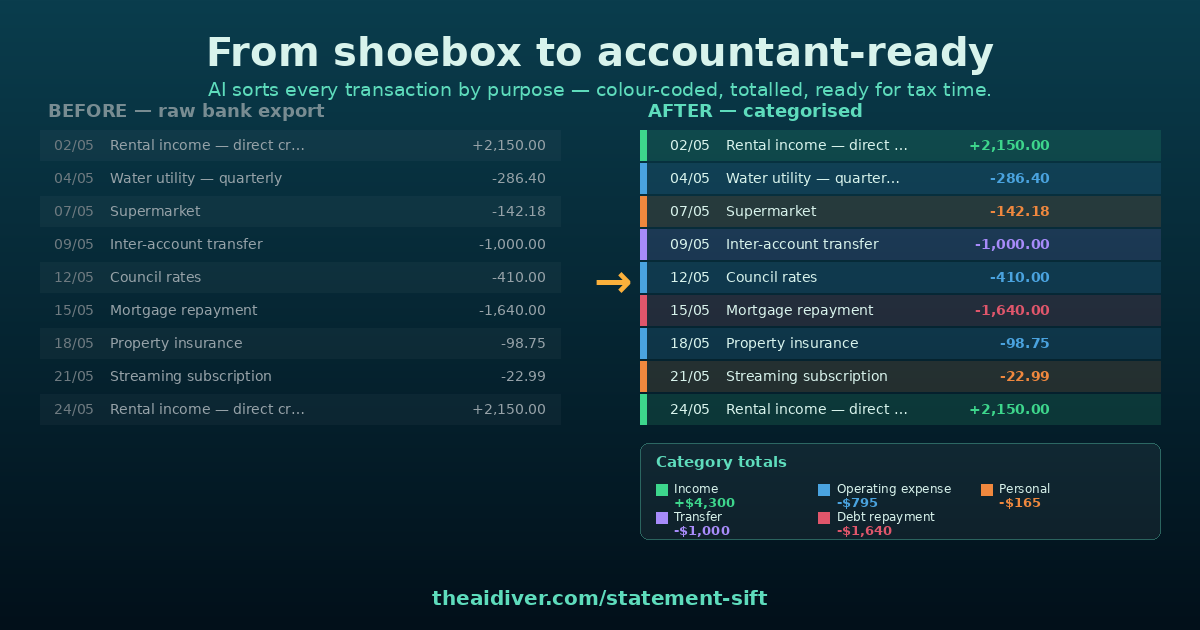
Every transaction sorted by purpose — income, operating expense, personal, transfer, debt repayment — not just dumped by account.
See the shape of your money
Colour-coded so you read your year at a glance, not row by row. The picture, not just the data.
Category totals, done
Category totals ready to hand straight to your accountant or drop into your return prep.
Nothing is a black box
Your original descriptions kept alongside every line — so everything is verifiable, and nothing is taken on trust.
A workbook that just works
Sorted newest-first, currency-formatted, frozen headers. Opens clean on any machine.
Three steps. You touch it twice.
No software to learn. No login to set up. Send, and surface with a workbook.
Step 01 · Send
Send your exports
Export your statements (CSV or PDF) from your online banking and upload them through one secure form. That's the first of only two times you touch this.
Step 02 · Sift
We sift
We sort every transaction by purpose, flag anything genuinely ambiguous, and check it against your rules. First time, we ask a few quick questions ("this one — personal or business?"). After that, we remember.
Step 03 · Surface
You get the workbook
Inside 48 hours: clean, categorised, colour-coded, accountant-ready. The second and last time you touch it — opening your inbox.
Fixed price. You know the number before you start.
No hourly. No surprises. Just send your statements and pick the tier that fits.
Returning clients are faster and cheaper — your rules carry over, so each round needs less from you. 🦪
"Can you actually do this, or just talk about it?"
Fair question. For years my day job has been one of the least glamorous, highest-stakes jobs in software: moving years of records between systems and producing files that have to match a regulator's exact spec. Get one field wrong and it costs you later, where it hurts.
🧭 That's the same muscle pointed at your statements. Profile the data. Sort it by what it actually means. Prove every line. Hand you something you can read.
The domain changed. The method didn't.
We sort and categorise your data. We don't give tax advice and we don't lodge anything — that's your accountant's job, and we make their job easier. You get a clean picture; the decisions stay with you and your accountant.
Surface intervalStop dreading the shoebox.
Once you can see where your money's going, the next question writes itself: where's it leaking? That's a different dive — the AI Audit. But first, let's just get your statements sorted. 🤿
Send your statements. Get back a workbook. 48 hours.